
What started as a short-term hack for us ended up being an open source project that’s now used across Go-Jek. For us, this was a great lesson on how putting small hacks together to make sure things work, and later abstracting them out to a broader product can make our life easier.
We started with trying to find a good way to restrict network access to valid users in a secure and effective fashion.
In most work environments, restricting access to a network is usually achieved using jump boxes, which are basically special-purpose computers on a network, typically used to manage devices in a separate security zone. A more sophisticated approach to handle this is to use an enterprise VPN with a radius server backed by a LDAP server. While a jump box seemed like an obvious solution, there were still a few issues:
- The jump box was still an open server for everyone to attack.
- We needed to create everyone’s login on jump boxes on a regular basis.
- We still had to open our internal web portals to public access.
Given these problems and seeking a simple solution, we resorted to an OpenVPN Server. This worked out great up to a point, but soon we ran into another issue — we had 1200+ employees who needed several access types, and we had to go about creating VPN profiles for each of them. We had solved problem statement (1), but (2) and (3) were still pending.
We also needed to deal with user management on OpenVPN server as well as user management across the organization for all of our users.
During this time, our DevOps team was flooded with manual tasks, as requests kept pouring in. To address this, they started creating RunDeck jobs to automate several things including VPN profile creation. While our problem was not solved completely, the problem statement evolved a bit. Our task was clear:
- Create a self-service page for signup to VPN
- Provide authentication, but avoid weak passwords
- Centrally manage all authorisation and access
Creating self-serving service enterprise access was a big task. But we managed to find a fairly simple solution to this. The rule was, “If you have a Go-Jek email address, then you are authorized to access our servers, environments and portals in some way.”
OpenVPN with self sign up and MFA
Based on the above rule, we quickly setup a service, which upon login, redirects users to our enterprise Google Apps for Work OAuth page. Once that page authenticates the users, then we do following:
- Automatically create a VPN profile for the user behind the scene
- Generate a Google MFA TOTP string
- Present the user with a QR code to scan and add a Google MFA profile
- Set them up as a valid user in system
Once they pass through these steps, users are presented with instructions to download VPN profile and can authenticate against our OpenVPN server, as shown in these images below.
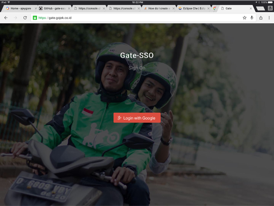 OAuth Login
The first image shows an OAuth sign on page. Once users sign in, we complete following steps one by one:
- Check if we have a new user; if yes, create a new user in our system
- Create a TOTP string for the new user and present them with a QR code when rendering the page
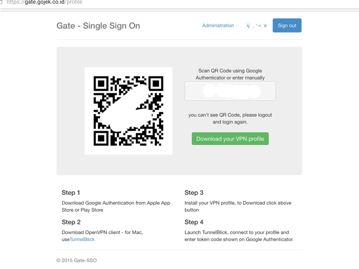 Gate SSO
Once equipped with these three pieces of information, we present a page to the user to download their VPN profile and setup MFA. We called our little system Gate SSO.
Once equipped with these three pieces of information, we present a page to the user to download their VPN profile and setup MFA. We called our little system Gate SSO.
With this, we were able to solve the problems for user to login to VPN and to access servers behind our VPN. It worked great because we could disable a user from the Gate’s administration UI. Also, since this gave users a token that changes every minute, they didn’t have to comply with complex passwords. We also limited login attempts per hour to 15, so that no one could brute force it. It’s still technically possible, but with chances as low as 15 out of 99999 combinations, the security risk is limited. Even so, we later moved to a pin + token model, which makes it even harder.
This was great user experience because our OpenVPN server was now able to authenticate with our rest based Gate service by hitting a URL with username and MFA token.
While this made life much easier, it still did not solve the problem for users accessing our portals, they were still clunky and everyone could access them. Since we had worked with JaSig CAS extensively, we turned to CAS to help find a solution. Given our success so far, we decided to use a similar approach to solve this problem too.
About Author
 Ajey Gore (Go-Jek CTO)
With 17 years of experience in building core technology strategy across diverse domains, Ajey has helped several businesses through technology transformations @ Thoughtworks and CodeIgnition. Ajey is the founder of Codeingnition and an active influencer in the technology community.
Stay tuned for the second and final part of this series of posts to see how we went about this.
Comments
via GitHub · no account? tweet at me